



 Properties
On this tab can by placing a tick behind “Beep at search window”, you will hear a beep if, while you are working in the programme, the search window automatically appears. This of course depends on the setting for sounds in Windows itself.
In addition, it is possible to protect WinTree Nursery Manager with a password. This means that before you can start up a program, you will be asked to type in a password. You can specify your password using the Password button.
Parameters
If WinTree is logged in as a user with 'administrator rights' to set this up see: Employees, the button [Parameters] will be available.
Clik on the button [parameters].
If this button is not visible, the user that is logged in is not an administrator within WinTree. Therefore parameters cannot be adjusted.
Clik on [Seach] in the screen that appears.
The screen below appears:
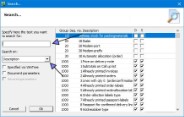


At “Search on” you can search by (part of) the description or by number.
When a parameter has to be adjusted on the advice of TSD, a number will be provided to you.
Make a choice on which to search for and enter a search term or the number of the parameter at the top and click on [OK].
Depending on the search term, 1 or more parameters that meet the conditions appear.
Select the parameter to be adjusted.
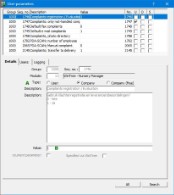
At "A" you can see whether the adjustment applies to the entire company or whether it is determined per user.
At ‘B’ you can see the current value.
If it is an "company parameter", the value can be adjusted here. The options are shown at "Description".
If it concerns a "user parameter", the value per user must be adjusted in the "Users" tab.
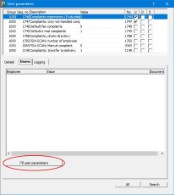
With the button [Fill user parameter] the default value for each user can be filled in for every user.
After which a deviating value can be entered per user in the "value" column.
The screen can be closed with the cross. Restart WinTree to continue working with the new settings.
For adjusting paramters see also: Parameters.