



 Preferred values
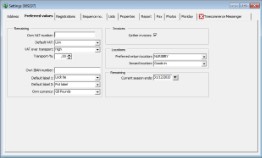


Remaining (left)
You find your preferred values on the preferred values tab. You can enter VAT data here, for example. The VAT codes in the choice fields, such as Low and High, are related to the values that you can enter under the Main menu choice File -> Basic information -> VAT.
| Own VAT-number | Your companies own VAT number |
| Default VAT | The standard VAT rate that is applied |
| VAT over transport | The default VAT rate over transport |
| Transport-% | If a default percentage on transport cost on the invoice needs to be added, this can be filled in here. This percentage will be automatically used for every new customer. Per customer this setting can be changed. |
| Own IBAN number | Fill in your companies own IBAN number. |
| Default label 1 | Select your first choice label. This defaults for newly created qualities |
| Default label 2 | This is the secondary label choice. |
| Own currency | Select the own currency in the list. The list can be adjusted: File -- Basic information -- Prices -- Currency. |
The settings that you define for standard VAT, VAT on transport, and transport-% are automatically carried over when you create a new customer.
Combining invoices
Checking the checkbox next to Collect in the Invoices section of the window, gives you the possibility to combine deliveries. If you invoice while you this option is selected, all the deliveries that have yet to be invoiced will be shown on one invoice. If you choose not to do this, an invoice will be generated per shipment. This default value can be deviated per customer.
Locations
With the dropdown list the preferred return location an inward location can be selected. The dropdown lists can be found: File -> Basic inforamation -> Stock -> Locations.
The inward location is only available when module 62 Inward Goods is activated.
Remaining (right)
Fill in the date of the season end. This date is used to determine the total sales value of a customer when creating a sales order. And also for determining if the stock is Phyto sanitarily your countries.